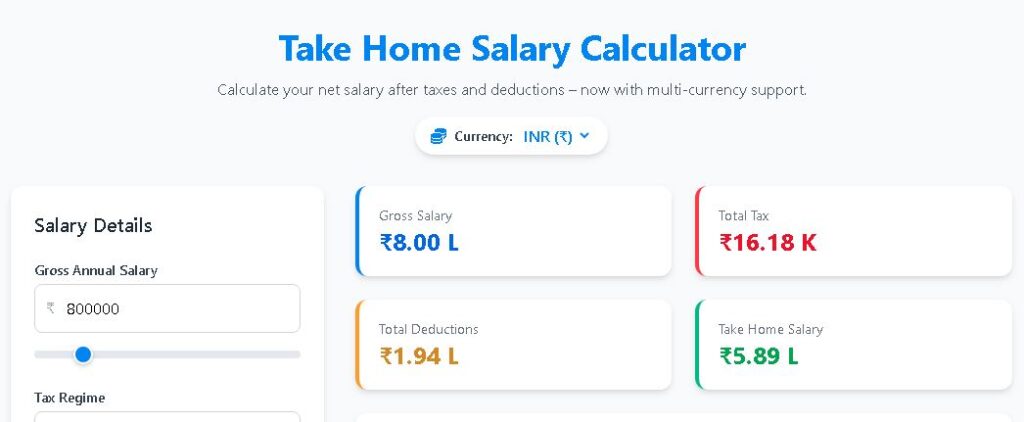
Take Home Salary Calculator
Calculate your net salary after taxes and deductions – now with multi‑currency support.
Salary Details
Detailed Breakdown
Salary Distribution
Annual Breakdown
Monthly Breakdown
📘 The Complete Guide to Understanding Your Take‑Home Salary
Your take‑home salary is the amount that actually lands in your bank account after all statutory deductions and income taxes are subtracted from your gross pay. For salaried employees, understanding exactly how this number is calculated is crucial for financial planning, loan eligibility, and setting realistic savings goals. This guide walks you through every component that affects your in‑hand salary, compares the old and new tax regimes, and shows you how to use our calculator to get an instant, accurate estimate.
What is Gross Salary vs. CTC?
Gross salary is your total earnings before any deductions. It includes basic salary, house rent allowance (HRA), special allowances, bonuses, and other perks. Cost to Company (CTC), on the other hand, adds employer contributions like EPF, gratuity, and medical insurance. Your take‑home salary is always less than both gross and CTC because mandatory deductions—like your share of EPF, professional tax, and TDS—are taken out first.
🔢 The Core Formula
At its simplest, the net annual salary formula is:
Net Salary = Gross Salary – (EPF + Professional Tax + Other Deductions) – Income Tax – Cess
Monthly take‑home is then that annual net divided by 12. This calculator follows exactly that logic, adjusting for whichever tax regime you choose.
💰 Understanding EPF (Employee Provident Fund)
EPF is a retirement savings scheme where both employee and employer contribute 12% of your basic salary (or a capped amount) each month. While the employer’s contribution goes partly to your pension, the employee’s contribution comes directly from your gross pay. Our calculator applies the EPF percentage to your entire gross salary as an approximation, but in reality it’s calculated on basic + dearness allowance. You can adjust the percentage to match your actual payroll structure.
📋 Professional Tax and Other Deductions
Professional tax is a state‑levied tax, typically ₹200 per month in many Indian states, but it can vary. It’s a fixed amount deducted from your salary. Additionally, you might have deductions for health insurance, National Pension System (NPS), or loan repayments. All these reduce your taxable income and, consequently, your take‑home pay. For a detailed comparison with other tools, you can check the AmbitionBox Take Home Salary Calculator which also shows salary insights by company, or the Groww Salary Calculator that breaks down tax liability with investment declarations.
📊 Tax Regimes: New vs. Old – Which Should You Choose?
India’s income tax system offers two regimes for individuals. The choice can significantly impact your take‑home salary.
New Tax Regime (default from FY 2023‑24)
- Lower tax rates but no major deductions (like 80C, 80D, HRA) are allowed.
- Slabs: 0–₹3L (0%), ₹3–6L (5%), ₹6–9L (10%), ₹9–12L (15%), ₹12–15L (20%), above ₹15L (30%).
- Standard deduction of ₹50,000 is available from FY 2023‑24 onwards.
Old Tax Regime
- Higher tax rates but you can claim exemptions and deductions (Section 80C up to ₹1.5L, 80D, HRA, LTA, etc.).
- Basic exemption limit: ₹2.5L for below 60, ₹3L for 60–80, ₹5L for above 80.
- Tax slabs after exemption: 5% (₹2.5–5L), 20% (₹5–10L), 30% above ₹10L.
The best regime depends on how much you can claim in deductions. If your eligible deductions exceed ₹1.5–2 lakh, the old regime often yields lower tax. Our calculator lets you instantly see the difference by switching the dropdown.
💡 A Practical Example
Suppose your gross annual salary is ₹8,00,000. With EPF at 12% (₹96,000), professional tax ₹200/month (₹2,400), and no other deductions, your taxable income under the new regime (after standard deduction of ₹50,000) is ₹8,00,000 – ₹96,000 – ₹2,400 – ₹50,000 = ₹6,51,600. Tax = 0% on first 3L + 5% on next 3L (₹15,000) + 10% on remaining ₹51,600 (₹5,160) = ₹20,160. Cess 4% = ₹806. Total tax ≈ ₹20,966. Net annual = ₹8,00,000 – ₹98,400 – ₹20,966 = ₹6,80,634. Monthly take‑home ≈ ₹56,719. Under the old regime, if you claim full 80C and other deductions, your tax could be even lower. Test both scenarios on this page.
🌍 Multi‑Currency Flexibility
While Indian salary structures dominate, many professionals work abroad or deal with global compensation. The currency selector (₹, $, €, £, ¥) changes the symbol throughout the calculator without converting exchange rates. This is handy for Non‑Resident Indians (NRIs) or expats who want to model their earnings in a familiar currency. The underlying calculations remain identical.
🔄 Real‑Time Adjustments and Visual Feedback
Every input—slider, dropdown, or number field—updates the results instantly. The doughnut chart breaks your annual earnings into take‑home, taxes, and deductions, while the bar chart compares monthly gross, deductions, taxes, and net pay. This visual feedback helps you understand how even a small change (like a ₹500 deduction) impacts your final in‑hand amount.
📌 Common Mistakes That Distort Your Calculation
- Ignoring the standard deduction: Both regimes now allow a ₹50,000 standard deduction. Our calculator automatically applies it in the old regime.
- Using CTC as gross salary: Always use the gross salary (CTC minus employer PF, gratuity, etc.) to get an accurate take‑home.
- Forgetting state‑specific professional tax: Check your state’s monthly PT amount; ₹200 is common but not universal.
🔗 Additional Resources
While this tool gives you a reliable estimate, salary structures can be complex. For company‑specific salary breakdowns and anonymous insights, the AmbitionBox Take Home Salary Calculator is an excellent resource. If you want to factor in equity, bonuses, or detailed investment declarations, the Groww Salary Calculator can complement this tool. Both are free and trusted by millions of users.
🧠 Tips to Maximize Your Take‑Home Salary
- Optimize your salary structure: If your employer allows, restructure your pay to include tax‑free allowances like food coupons, LTA, or telephone reimbursements.
- Use the old regime if you invest: Claiming 80C (PPF, ELSS, life insurance), 80D (health insurance), and HRA can slash your tax outgo.
- Leverage NPS: An additional deduction of ₹50,000 under Section 80CCD(1B) is available only in the old regime.
- Check for surcharge: If your income exceeds ₹50 lakh, a surcharge applies. This calculator currently focuses on income below that threshold, but you can manually add surcharge in ‘Other Deductions’ if needed.
📅 Tax Planning Throughout the Year
Don’t wait until March to think about taxes. Use this calculator quarterly to project your tax liability and adjust your investment declarations. By submitting actual rent receipts and investment proofs on time, you avoid excess TDS and keep your monthly cash flow stable. Combining this tool with the Groww Salary Calculator allows you to simulate various deduction scenarios before making financial commitments.
🔍 Frequently Asked Questions
Q: Is professional tax the same in all states?
No, it varies. Maharashtra, for example, charges ₹200/month up to a certain income slab, while some states like Rajasthan charge less. Always check your state’s rules.
Q: Can I change the EPF percentage?
Yes, the default 12% can be adjusted. Some organizations allow a lower or higher voluntary contribution.
Q: Does the calculator consider surcharge and marginal relief?
For simplicity, it does not include surcharge for incomes above ₹50 lakh. For high‑income earners, treat the result as an approximation and consult a tax advisor.
⚠️ Important Disclaimer
This calculator provides estimates for educational and planning purposes only. Actual tax liability may vary based on exact salary structure, applicable deductions, and changes in tax laws. Always consult a qualified tax professional for official calculations. Finance Toolbajar is not liable for any financial decisions made using this tool. External links are provided for additional reference and do not imply endorsement.