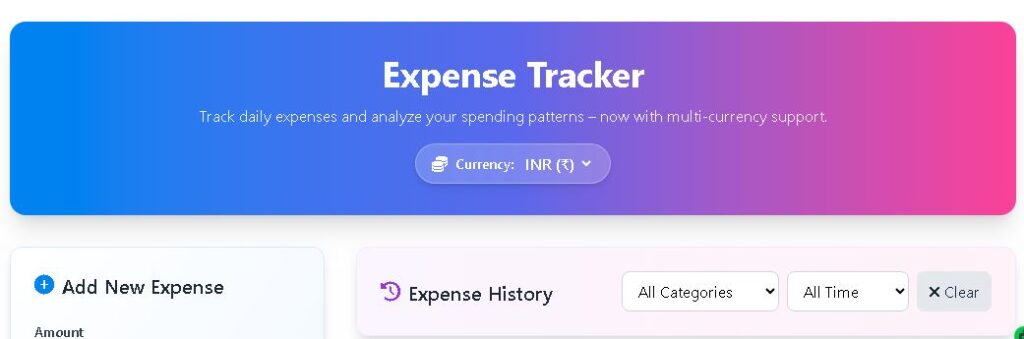
Expense Tracker
Track daily expenses and analyze your spending patterns – now with multi‑currency support.
Add New Expense
Expense Summary
By Category
Expense History
No expenses recorded yet. Add your first expense to get started.
Spending Analysis
By Category
Weekly Trend
📘 The Ultimate Guide to Expense Tracking – Tools, Tips & Templates
Introduction
Keeping an eye on your daily spending is the foundation of personal financial health. An expense tracker, whether it’s a simple spreadsheet, a mobile app, or a web‑based tool like the one above, helps you understand where your money goes every month. In this comprehensive guide, we’ll explore why tracking expenses matters, how to choose the right tool for your needs, and provide links to some of the most useful resources available – including expense tracker templates, design inspiration, and dedicated apps. You’ll also learn how our multi‑currency expense tracker works and pick up actionable budgeting tips.
Why Track Your Expenses?
Without a clear picture of your cash flow, it’s easy to overspend and derail your financial goals. Expense tracking:
- Reveals hidden spending patterns (like that daily coffee adding up to ₹3,000 a month).
- Helps you create a realistic budget and stick to it.
- Prevents credit card debt by showing exactly how much you can safely spend.
- Makes it easier to save for emergencies, a down payment, or a vacation.
- Provides valuable data when you need to adjust your lifestyle or cut costs.
If you’re new to tracking, you might start with a simple monthly expense tracker like the one offered by No More Debts – a free, printable PDF that lets you log daily spending by category. It’s an excellent analog starting point before moving to digital tools.
How Our Online Expense Tracker Works
The Finance Toolbajar expense tracker stores your expenses locally in your browser, so no data leaves your computer. It supports multiple currencies (just pick INR, USD, EUR, GBP, or JPY from the selector) and recalculates totals and charts instantly. The core formulas are straightforward:
- Total expenses = sum of all amounts.
- Category totals = sum per category (Food, Transport, etc.).
- Monthly and daily sums filter by date.
- Weekly trend = bar chart of daily spending over the last 7 days.
You can add, edit, and delete entries; the doughnut chart shows spending proportions, while the bar chart highlights your most expensive days. For designers looking to build a visually appealing expense tracker, Dribbble’s expense tracker design gallery is a goldmine of UI inspiration – from minimalist mobile interfaces to full‑featured dashboards.
Expense Tracker Apps and Software
If you prefer a dedicated application, the Microsoft Store offers a native expense tracker for Windows: Expense Tracker – Microsoft Store. It integrates with OneDrive and can sync across devices. For those who live in the productivity ecosystem, Notion’s expense tracker template is incredibly flexible – you can customize categories, add formulas, and link to other databases. Many users start with that template because it’s free and works across web, desktop, and mobile.
Choosing the Right Expense Tracker for You
With so many options, how do you pick? Consider these factors:
- Ease of use – A clutter‑free interface encourages consistent tracking. Our web tool is intentionally simple, while Notion templates offer more customization.
- Mobility – If you need to log expenses on the go, a mobile app or a responsive web app (like this one) is essential.
- Data privacy – Local storage (browser) keeps data private; cloud‑based apps offer sync but may share analytics.
- Reporting – Charts, category breakdowns, and export options help you analyze trends.
- Cost – Many trackers are free; premium apps (YNAB, Mint) add advanced budgeting features.
For a quick visual benchmark, browsing Dribbble can help you decide what type of interface you find most intuitive – some people love circular progress indicators, others prefer simple lists.
Advanced Budgeting Techniques
Once you’ve tracked expenses for a month or two, you can layer on budgeting strategies:
- 50/30/20 Rule – Allocate 50% to needs, 30% to wants, 20% to savings/debt. Compare your actual category totals to these targets.
- Zero‑Based Budgeting – Assign every rupee a job before the month begins. Use the tracker to verify your categories against the plan.
- Envelope System – Set a monthly limit per category (e.g., ₹5,000 for eating out) and stop spending when the envelope is empty.
- Automatic savings – Treat savings as a non‑negotiable expense. Track it as a separate “savings” category or simply transfer it first.
Common Expense Tracking Mistakes
Even with the best tools, people often:
- Forget small cash purchases – keep a note on your phone or use the tracker immediately.
- Over‑categorize – stick to 7‑10 broad categories to avoid analysis paralysis.
- Don’t review the data – set a recurring reminder every Sunday to look at charts and adjust.
- Underestimate irregular expenses (annual insurance, car maintenance) – consider setting aside a monthly amount for these “sinking funds”.
How to Use Our Tracker Effectively
Bookmark this page and try to log every expense right after making it. Use the category filter and time filter to review weekly or monthly reports. The doughnut chart will quickly show if your “food” slice is dominating – a sign you might be eating out too often. The weekly bar chart reveals weekend spikes, which can help you plan free or low‑cost activities.
Real‑Time, Persistent, and Private
Because everything is stored in localStorage, you can close the browser and come back to your data later. Nothing is uploaded – perfect if you’re cautious about cloud privacy. The multi‑currency symbol is purely cosmetic, so you can track expenses in any currency without conversion.
Printable vs Digital Trackers
If you prefer pen and paper, the No More Debts monthly tracker is a great free download. However, digital tools have the edge with automatic calculations and charts. You could even use both – record on paper during the day and enter into the digital tracker in the evening.
Designing Your Own Tracker
Inspired by the designs on Dribbble? You can build a custom tracker using Google Sheets, Notion, or even a simple HTML/JS project. The key is to keep it consistent – pick a color scheme for categories and stick to it. For ready‑made solutions, Microsoft Store’s expense tracker is a polished option for Windows users.
Budgeting Tips for Long‑Term Success
- Automate bill payments and savings – less to track manually.
- Set a weekly “money date” to review expenses and update your budget.
- Use the tracker to calculate your average monthly discretionary spending, then aim to reduce it by 10%.
- Involve your partner or family – shared accountability improves results.
⚠️ Important Disclaimer
This expense tracker is for personal record‑keeping and educational purposes only. It is not a substitute for professional financial advice. Finance Toolbajar is not responsible for any financial decisions based on this tool. Always consult a qualified advisor for significant money matters.
Start tracking today – a clear picture of your spending is the first step toward financial freedom.