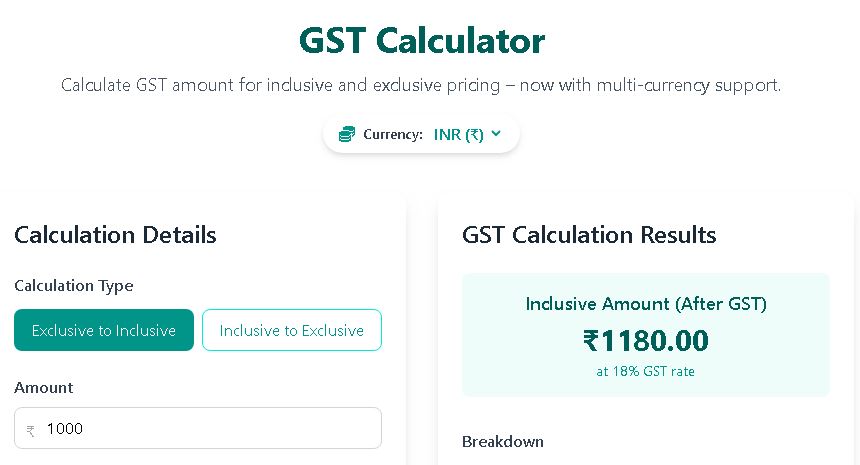
GST Calculator
Calculate GST amount for inclusive and exclusive pricing – now with multi‑currency support.
Calculation Details
About GST
GST (Goods and Services Tax) is a comprehensive indirect tax levied on the supply of goods and services in India. It replaced multiple cascading taxes levied by the central and state governments.
GST Calculation Results
Inclusive Amount (After GST)
₹1,180.00
at 18% GST rate
Breakdown
GST Components
CGST
Central GST
Levied by Central Government
SGST
State GST
Levied by State Government
📘 How GST Works – Formulas, Examples & Tools
What is GST? – Goods and Services Tax (GST) is a value‑added tax levied on most goods and services sold for domestic consumption. In India, it is divided into two components: CGST (Central GST) and SGST (State GST), each typically half of the total GST rate for intra‑state transactions. For inter‑state supplies, IGST (Integrated GST) is applied (not shown separately in this calculator).
🔢 The core formulas
If the base price (excluding GST) is P and the GST rate is r%:
- GST amount = P × (r / 100)
- Total inclusive amount = P × (1 + r/100)
If the total inclusive amount is T and you need the base price:
- Base price = T / (1 + r/100)
- GST amount = T – base price
For example, if you have a base price of ₹1,000 and GST is 18%, the GST is ₹180, and the total is ₹1,180. Conversely, if you see a price of ₹1,180 including 18% GST, the base price is ₹1,180 / 1.18 = ₹1,000.
📊 CGST & SGST split
For intra‑state sales, the total GST is divided equally into CGST and SGST. So at 18% GST, CGST = SGST = 9% each. Our calculator automatically shows this split. For inter‑state sales, IGST applies as a single tax (not split).
💡 Common GST rates in India
- 5% – essential items (e.g., packaged food, medicines)
- 12% – processed food, computers, etc.
- 18% – most services, capital goods, consumer durables
- 28% – luxury goods, sin products (cars, tobacco, etc.)
You can select these preset rates using the buttons above.
🌍 Multi‑currency support
Choose your preferred currency from the top dropdown. All amounts are displayed with the selected symbol; no exchange rate conversion is applied. This is useful for businesses dealing with international clients or for simple price comparisons.
🔄 Real‑time updates
Every input (amount, GST rate, calculation type) triggers an immediate update – no need to press the Calculate button, though it remains for clarity.
🧮 Why Use a GST Calculator?
Manually computing GST for every transaction is error‑prone, especially when dealing with mixed rates or reverse‑calculating exclusive prices. A reliable GST calculator saves time and eliminates mistakes. Our tool instantly splits CGST and SGST, supports multiple currencies, and lets you toggle between inclusive and exclusive modes. Whether you’re a freelancer, small business owner, or accountant, a dedicated online GST calculator keeps your invoices accurate and compliant.
📌 How to Use This GST Calculator
Step 1: Choose the calculation type – “Exclusive to Inclusive” if you know the price before tax, or “Inclusive to Exclusive” if the total already contains GST.
Step 2: Enter the amount in your preferred currency.
Step 3: Select or type the GST rate (5%, 12%, 18%, 28% or any custom rate).
Step 4: View the results immediately. The breakdown shows original amount, CGST, SGST, total GST, and final amount.
🔍 Exclusive vs. Inclusive – When to Use Each
Exclusive to Inclusive is handy when you issue an invoice from a net price. For instance, if your service costs ₹5,000 and 18% GST applies, the inclusive total becomes ₹5,900.
Inclusive to Exclusive is useful when you see a retail price tag and need to know the tax component. A ₹2,360 item at 18% GST contains ₹2,000 as base price and ₹360 as tax.
🌐 Comparing Online GST Calculators
There are several excellent GST calculators available online, each with unique features. Here’s how ours compares with some popular alternatives:
- Zoho Books GST Calculator – Zoho’s free GST calculator is integrated with their accounting suite, offering a clean interface and export options. It’s great if you already use Zoho Books for invoicing.
- Wise GST Calculator – Wise’s GST calculator provides real‑time currency conversion alongside tax calculations, ideal for international businesses that need to handle cross‑border payments.
- TaxAdda GST Calculator – TaxAdda’s calculator is tailored for Indian users, with a simple interface and detailed breakdowns for all GST slabs. It’s a handy companion for tax professionals.
- MoneySmart GST Calculator (Australia) – The Australian government’s MoneySmart calculator helps compute 10% GST, reflecting Australia’s tax system. It’s a reliable official resource.
- Tally Solutions GST Calculator – Tally’s GST calculator is designed for businesses that use Tally ERP, featuring batch‑wise tax computation and integration with inventory management.
Our GST calculator stands out with its multi‑currency support, instant CGST/SGST split, and responsive design – no sign‑up required. Whether you need a quick Indian GST calculator or a flexible tool that handles any currency, we’ve got you covered.
💼 Practical Examples in Different Currencies
INR: Base amount ₹15,000, 12% GST → GST ₹1,800 (CGST ₹900 + SGST ₹900), total ₹16,800.
USD: Base $200, 5% GST → tax $10, total $210.
EUR: Inclusive €944 at 18% → base €800, GST €144.
These examples show how the same formula works universally – only the currency symbol changes.
❓ Frequently Asked Questions
Q: Can I use this calculator for IGST?
A: Yes – simply treat IGST as the total GST rate and ignore the CGST/SGST split. The total tax amount will be correct.
Q: Why are CGST and SGST always equal?
A: For intra‑state transactions, GST revenue is shared equally between the Centre and the State. That’s why the calculator shows 50% each.
Q: How do I calculate GST backwards?
A: Select “Inclusive to Exclusive” mode, enter the total price, and the tool instantly extracts the base amount and GST.
Q: Is this calculator free?
A: Absolutely – no hidden costs, no registration. You can use it as many times as you like.
📋 Tips for Accurate GST Calculation
- Always confirm the correct GST rate for your product/service category. Use official sources like the CBIC website.
- When issuing invoices, clearly show the base amount, GST rate, and tax split (CGST/SGST or IGST) to maintain compliance.
- For mixed supplies with different rates, calculate each line separately. Some advanced GST tax calculators like Zoho Books offer invoice‑level tax computation.
- Keep in mind that GST is a destination‑based tax; place of supply determines whether CGST+SGST or IGST applies.
- If you frequently deal with international transactions, consider a tool like the Wise GST calculator that factors in currency exchange.
📱 Mobile‑Friendly GST Calculations
Our calculator works seamlessly on smartphones and tablets. Whether you’re at a store checking a price tag or in a meeting preparing an invoice, you can compute GST on the go. The large touch targets and clear layout make it one of the most user‑friendly GST calculator apps available as a web tool.
Still exploring options? Many professionals also rely on the TaxAdda GST calculator for quick estimates and the Tally GST calculator when dealing with bulk inventory. For Australian GST, bookmark the MoneySmart GST calculator – it’s an official and trusted resource.
⚠️ Important Disclaimer
This calculator provides estimates based on the inputs and is intended for educational purposes. Actual tax liabilities may vary based on specific rules, exemptions, and changes in legislation. Always consult a qualified tax professional for official calculations. Finance Toolbajar is not liable for any financial decisions made using this tool.